
Specialized Extensions
Specialized Extensions
Section titled “Specialized Extensions”Koakademy installs its six established community domain extensions from their
dedicated Composer repositories into vendor/. Forms is also a Composer package.
The licensed reporting prototype remains in Modules/EnterpriseReporting until
it is extracted and released. The Modules\\... PHP namespaces stay unchanged.
Installation-wide module changes take effect after workers are restarted or rolled. Purchased enterprise capabilities are activated separately
for each school and take effect on subsequent requests.
1. Announcements Module (Modules\Announcement)
Section titled “1. Announcements Module (Modules\Announcement)”The Announcements module coordinates school-wide and targeted communications across all user portals:
- Audience Targeting: Publish bulletins globally, or restrict visibility to specific schools, roles (e.g. Faculty only, Students only), academic departments, or degree programs.
- Top Banner Alerts: Urgent alerts (such as typhoon class cancellations or emergency advisories) can be pinned as a high-visibility global banner across all portals.
- Scheduled Publishing: Specify publication and expiration dates so announcements publish and archive automatically.
- Rich Media & Attachments: Supports rich text formatting, downloadable PDF memos, and embedded imagery.
2. Cashier Module (Modules\Cashier)
Section titled “2. Cashier Module (Modules\Cashier)”The Cashier module provides counter operations for tuition collections, miscellaneous fee payments, and daily financial reconciliation:
- Rapid Counter Register: Barcode and ID scanner lookup pulls up student balances in under one second.
- Official Receipt (OR) Registry: Sequenced, auditable receipt numbers with automatic voiding workflows and supervisor approval gates.
- Multi-Tender Payments: Accept Cash, Cheques (with bank branch and clearing dates), POS credit/debit card terminals, and mobile e-wallets.
- Cash Drawer Balancing: End-of-day reconciliation comparing physical cash drawer balances against expected electronic ledger totals.
3. Inventory & Asset Management (Modules\Inventory)
Section titled “3. Inventory & Asset Management (Modules\Inventory)”The Inventory module tracks physical equipment, campus facilities, classroom furnishings, and IT hardware across buildings and rooms:
- Asset Catalog & Categorization: Classifies assets (Computer equipment, Laboratory instruments, Office furniture, AV equipment) with serial numbers and barcodes.
- Location & Room Tracking: Maps assets to specific buildings, floors, and classrooms (
Room). - Custodian Accountability: Issues Memorandum Receipts (MR) to faculty and staff members accountable for assigned hardware.
- Maintenance & Stock Ledger: Logs maintenance history, repair tickets, depreciation schedules, and inventory disposal.
4. Library Management System (Modules\LibrarySystem)
Section titled “4. Library Management System (Modules\LibrarySystem)”The Library System handles physical book cataloging, circulation desk operations, and student research archives:
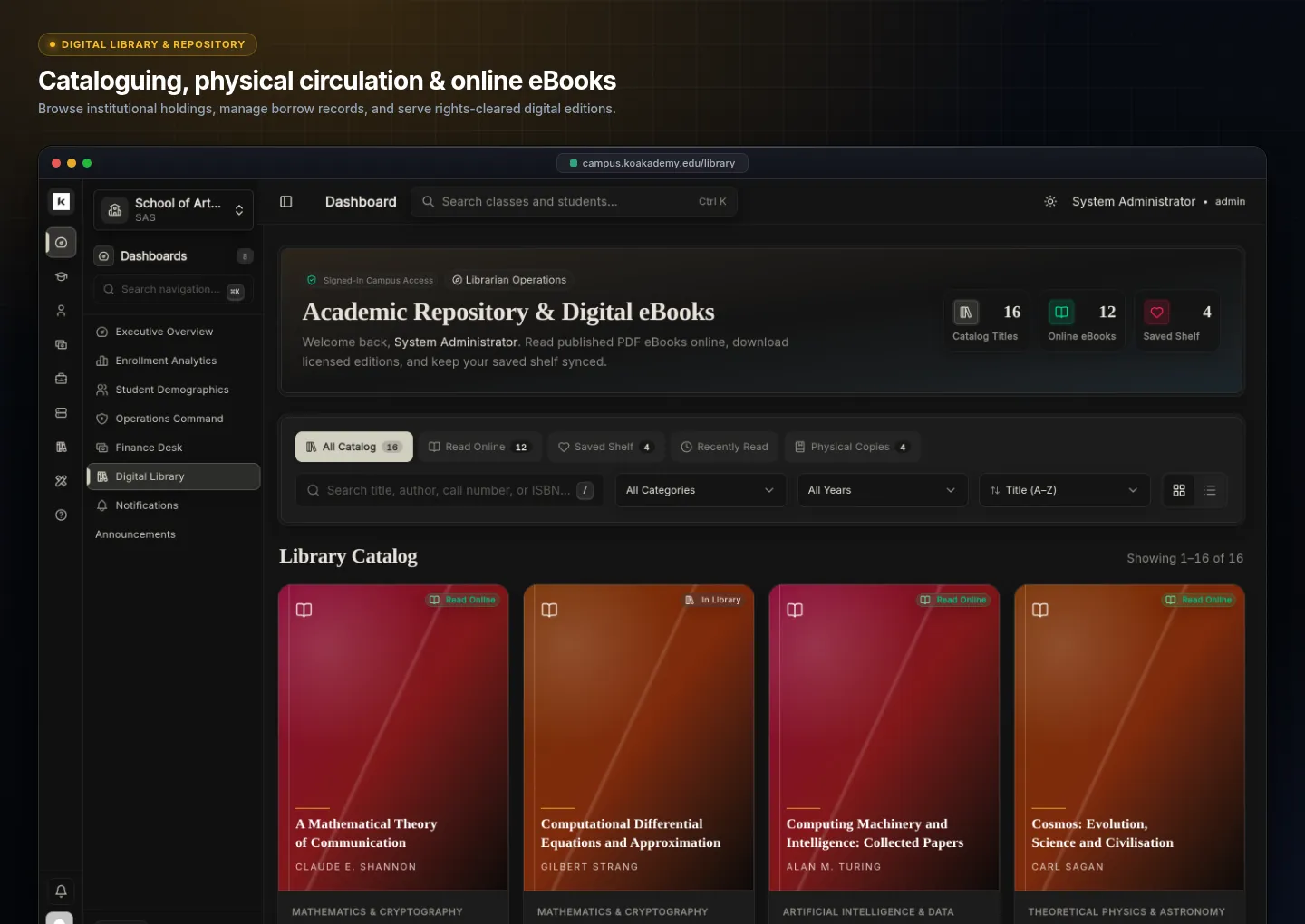
- Book Catalog & Classification: Catalogs volumes with ISBN, Dewey Decimal classification, author profiles, and barcode tracking.
- Circulation Desk: Fast barcode scanning for checkout and return transactions, enforcing borrowing periods based on user role (e.g. 3 days for students, 14 days for faculty).
- Overdue Fines Engine: Automated daily fine calculations for late returns, with automatic clearance hold integration.
- Theses & Research Paper Archive: Digital repository for undergraduate theses, capstone projects, and faculty research papers with searchable abstracts.
5. Notification Center (Modules\NotificationCenter)
Section titled “5. Notification Center (Modules\NotificationCenter)”The Notification Center coordinates automated transactional communications across multiple channels:
- Template Engine: Customizable notification templates with dynamic merge tags (e.g.
{student_name},{amount_due},{class_name}). - Multi-Channel Dispatch: Dispatches messages via database notifications (in-portal bell alerts), email (SMTP/SES), and SMS gateways.
- Batch Broadcast Queues: Leverages background queue workers to broadcast notices to thousands of students without blocking web requests.
- Event Triggers: Automated dispatches on enrollment approval, grade publication, payment receipt, and clearance holds.
6. Student Medical Records (Modules\StudentMedicalRecords)
Section titled “6. Student Medical Records (Modules\StudentMedicalRecords)”The Clinic module provides student clinic records with application permission controls:
- Student Health Profiles: Tracks blood type, chronic illnesses, severe allergies, immunization records, and emergency contact details.
- Clinic Visit Encounters: Records date/time, presenting symptoms, nursing diagnosis, administered medication, and recommended action.
- Medical Clearances: Issues digital medical clearances required for physical education, collegiate athletics, and internship deployment.
- Confidentiality Boundaries: Clinic notes are strictly isolated: faculty and general administrative staff cannot access private health records.
Consolidated School Reporting (Modules\EnterpriseReporting)
Section titled “Consolidated School Reporting (Modules\EnterpriseReporting)”The first enterprise extension compares enrollment, student records, and course counts across selected licensed schools for a common school year and semester. It includes a CSV export. Each participating school needs a signed license and explicit activation, and the user needs enrollment viewing permission and access to every selected school. See Enterprise Extensions for setup.
Extensions & Licenses and Standalone Packages
Section titled “Extensions & Licenses and Standalone Packages”These extensions and the Forms Module are maintained in their dedicated repositories and distributed through the Koakademy Module Registry. See Module ownership and migration for contribution and release order. extensions/starter/ is the development template, not the installation directory for production packages.
Administrators manage installed modules and school capabilities from Administrators → Extensions & licenses. Changing an installation-wide module state requires a worker restart or rollout. Importing a school license or activating a purchased capability does not require a new application image.